Some of the important components and accessories that we shall be referring to in the procedure for carrying out the imaging are shown in figure 36.5.
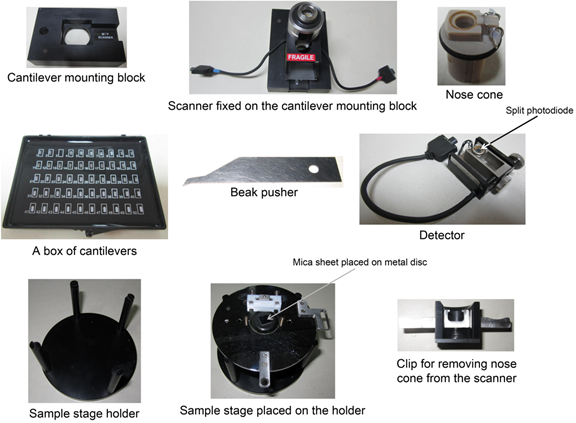
Figure 36.5 Components and accessories of an atomic force microscope from Agilent Technologies
- Switch ON the AFM instrument and the computer as instructed by the manufacturer.
- Take out the ‘Scanner’ and place it on the cantilever mounting block (Figure 36.6 A).
- Fix the specified ‘Nose cone’ into the scanner (Figure 36.6B).
- Carefully hold the AC mode specified cantilever chip using the tweezers (Figure 36.6C, 36.6D).
- Lift the clip of the Nose cone by pressing it against the beak pusher (Figure 36.6E).
- Mount the cantilever chip into the assembly, carefully placing it into the groove provided for the chip (Figure 36.6E).
- Orient the chip carefully such that the free cantilever tip hangs over the center of the nose cone.
- Release the pressure on the beak pusher, allowing the clip to hold the cantilever (Figure 36.6F).