Example M4.1
Consider the block diagram in Fig. M4.1.
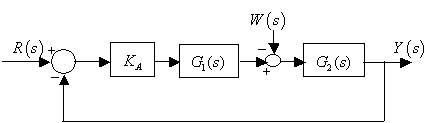
Fig. M4.1
Feedback System Simulation
System Response
The transfer function manipulations give us a transfer function model M(s) between command input R(s) and output Y(s); model Mw(s) between disturbance input W(s) and output Y(s); a model between command input R(s) and control U(s), etc. It is now easy to use some of the control analysis commands available from the Control System Toolbox. impulse(M) and step(M) commands represent common control analysis operations that we meet in this book. Also frequently used in the book are frequency-response plots.
Example M4.1
Consider the block diagram in Fig. M4.1.
Fig. M4.1
For value of gain KA = 80, the following two MATLAB sessions evaluate the step responses with respect to reference input R(s) and disturbance signal W(s) for

>> %Step response with respect to R(s)
>> s = tf('s');
>> KA = 80;
>> G1 = 5000/(s+1000);
>> G2 = 1/(s*(s+20));
>> M = feedback(series(KA*G1,G2),1)
>> step(M)
The MATLAB responds with
Transfer function:
.......................400000
--------------------------------------------------
s^3 + 1020 s^2 + 20000 s + 400000and step response plot shown in Fig. M4.2. The grid has been introduced in the plot by right clicking on the plot and selecting Grid option.
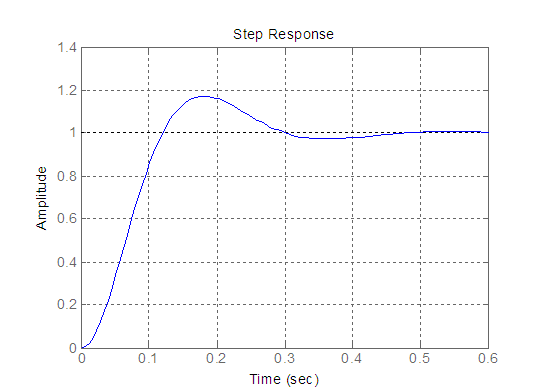
Fig. M4.2
>> %Step response with respect to W(s)>> s = tf('s');
>> KA = 80;
>> G1 = 5000/(s+1000);
>> G2 = 1/(s*(s+20));
>> Mw = (-1) * feedback(G2, KA*G1)
>> step(Mw)
MATLAB responds with
Transfer function:
.......................-s - 1000
----------------------------------------------------
s^3 + 1020 s^2 + 20000 s + 400000and step response plot shown in Fig. M4.3.
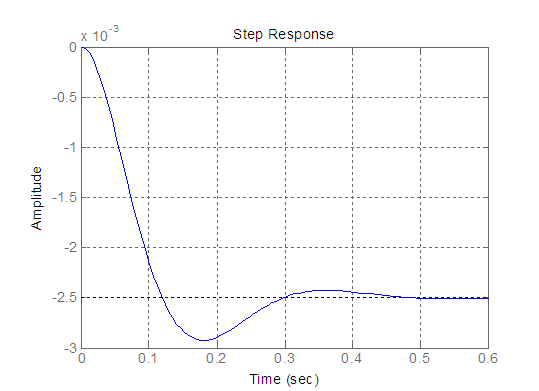
Fig. M4.3
Example M4.2
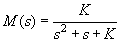
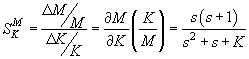
Let us examine the sensitivity of the feedback system represented by the transfer function
The system sensitivity to parameter K is
Figure M4.4 shows the magnitudes of
and
versus frequency
for K = 0.25; generated using the following MATLAB script. Text arrows have been introduced in the plot by following Insert from the main menu and selecting the option Text Arrow.
Note that the sensitivity is small for lower frequencies, while the transfer function primarily passes low frequencies.
w = 0.1:0.1:10;
M = abs(0.25./((j*w).^2+j*w+0.25));
SMK = abs((j*w .* (j*w + 1))./((j*w).^2 + j*w +0.25));
plot(w,M,'r',w,SMK,'b');
xlabel('Frequency (rad/sec)');
ylabel('Magnitude');
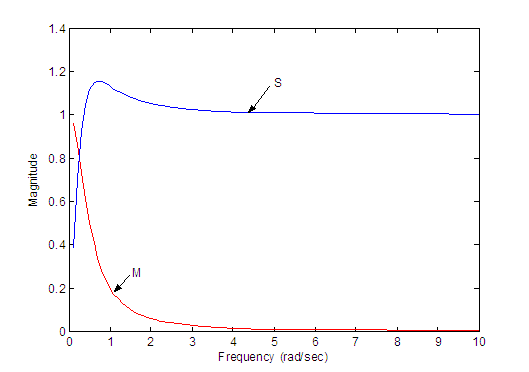
Fig. M4.4
Of course, the sensitivity S only represents robustness for small changes in gain K. If K changes from 1/4 within the range K = 1/16 to K = 1, the resulting range of step responses, generated by the following MATLAB script, is shown in Fig. M4.5. This system, with an expected wide range of K, may not be considered adequately robust. A robust system would be expected to yield essentially the same (within an agreed-upon variation) response to selected inputs.
s = tf('s');
S = (s*(s+1))/(s^2+s+0.25);
M1 = 0.0625/(s^2+s+0.0625);
M2 = 0.25/(s^2+s+0.25);
M3 = 1/(s^2+s+1);
step(M1);
hold on;
step(M2);
step(M3);
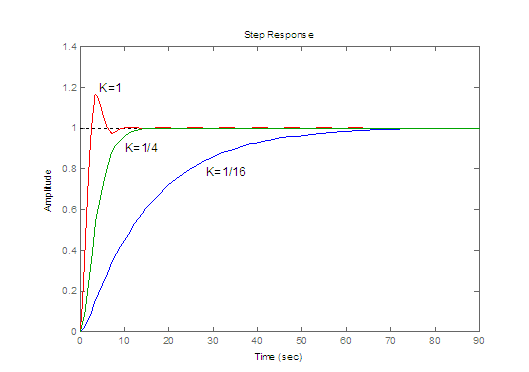
Fig. M4.5