Frequency Response Characteristics
Unity Feedback Systems on Nichols Chart
Nichols chart can be generated using the nichols(G) function for the MATLAB transfer function G. If the nichols function is invoked without left-hand arguments, the Nichols chart is automatically generated; otherwise one must use nichols in conjunction with the plot function. A Nichols grid can be drawn with the ngrid function.
Information about the plots obtained with nichols(G) can be found by left-clicking the mouse on the curve. You can find the curve's label, as well as the coordinates of the point on which you clicked, and the frequency. Right-clicking away from a curve brings up a menu. From this menu, you can select characteristics, such as peak response and stability margins. When selected, a dot appears on the curve at the appropriate point Let your mouse rest on the point to read the value of the characteristic. You may also select choice for grid on or off, returning to full view after zooming, and properties, such as labels, limits, units, style, and characteristics.
Example M 9.2
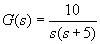
Consider a unity feedback system with open-loop transfer function
To produce a Nichols chart for the given system, with the closed-loop dB M-contours superimposed, use the commands:
s = tf('s');
G = 45/(s*(s+5));
w = 0.5:50;
nichols(G,w);
ngrid;
The corner frequency of the lag term is at w = 5 rad/sec. We will like to include a range of frequencies a decade above and below this corner frequency. Setting the frequency range from 0.5 to 50 rad/sec meets our requirements.
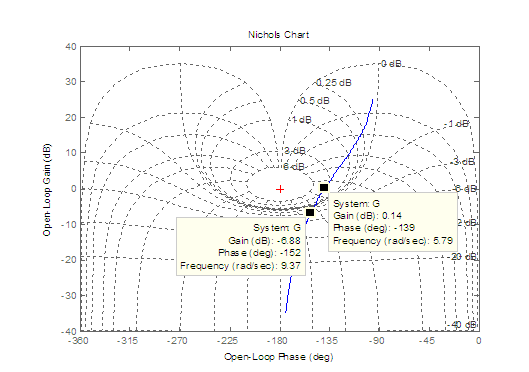
Fig. M9.3
We see from Fig. M9.3 that the response line is nearly tangential to the 3dB M -contour. Therefore the closed-loop frequency has no peak value above 3dB. Resonance frequency, read from the plot, is 5.79 rad/sec.
The intersection of the response line with - 3dB contour gives the bandwidth of the closed-loop system. Bandwidth, read from Fig.M9.3,is 9.37 rad/sec.
Gain and phase margins can also be determined from Nichols chart. However, the margin function is a convenient alternative.
Example M9.3
In this example, we study how to adjust the system gain to meet specifications on gain margin, phase margin, bandwidth and resonance peak. We consider a unity feedback system with open-loop transfer function
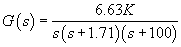
to illustrate the design process.
Bode plot generated using the command margin(G) for K = 1 is shown in Fig. M9.4.
s = tf('s');
G = 6.63/((s)*(s+1.71)*(s+100));
margin(G)
In order to find the range of K for stability, we notice from Fig.M9.4 that gain margin is 68.4 dB. Therefore the gain can be raised by
before the system is driven to the verge of instability.
Reconsider the system with K = 1. We now intend to find the gain K required for a closed-loop response of 20% overshoot for a step input. Using second-order approximation, a 20% overshoot implies a damping ratio of 0.456 and, this implies a phase margin of about 48 degrees. The phase angle should therefore be
at gain crossover frequency. Point the mouse at any point on the phase curve and left-click. The arrow curser changes to four-pointed arrow. Hold down the left mouse button and drag the four-pointed arrow along the phase curve. By trial-and-error, locate the point where the phase is - 132o.
The phase angle is
at
1.5 rad/sec where the gain is
dB (Fig. M9.4). Thus
for 20% overshoot.
Since the system is third-order, the second order approximation should be checked. Figure M9.5 shows the step response generated using the following code.
K = 52.48;M = feedback(K*G,1);
step(M);
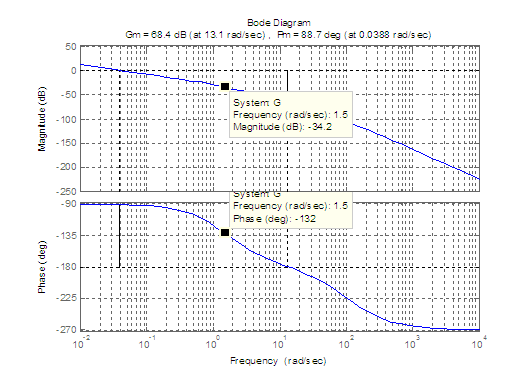
Fig. M9.4
From Fig. M9.5, we find the peak overshoot 20.6%.
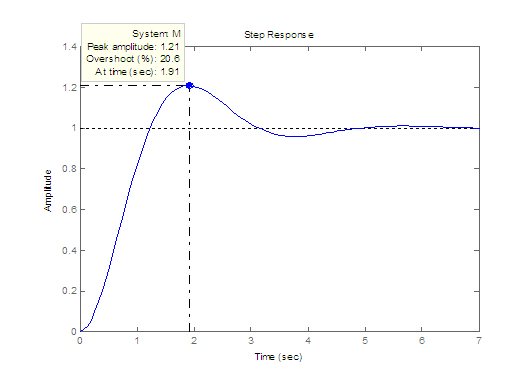
Fig. M9.5
Example M9.4
Consider a unity feedback system with open-loop transfer function
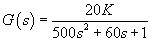
The Nichols chart for K = 1 is shown in Fig. M9.6.
s = tf('s');
G = 20/(500*s^2+60*s+1);
nichols(G)
The scale has been modified using Right click --> Properties --> Limits .
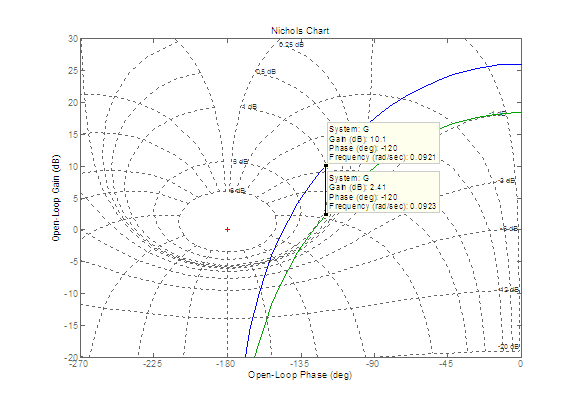
Fig. M9.6
We would like to alter K to provide a closed-loop resonance peak of 1dB. Finding a value of K to meet this specification is not as straightforward as satisfying a gain margin or phase margin specification. This is because it is not easy by inspection to locate the point on the original curve which would become tangential to the required M-contour. We proceed by trial-and-error. Luckily, the use of MATLAB makes this a fairly simple procedure and we find that by trying a couple of gain values, we can 'home in' on the most appropriate gain setting.
For the design problem under consideration, the trial-and-error gives a gain adjustment by a factor of 8.25/20. That is, reduction of gain by 7.69 dB.
Similar trial-and-error procedure can be used to meet the specifications on bandwidth.
Example M9.5
We can use MATLAB and frequency response methods to include the time delay in the loop. Consider a unity feedback system with the transfer function
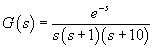
The response of the following MATLAB script is given in Fig. M9.7. The scale has been modified using Right click --> Properties -->Limits.
s = tf('s');
G = 1/(s*(s+1)*(s+10));
bode(G);
hold;
G1 = G;
G1.InputDelay = 1;
bode(G1);
In LTI object G1 created by MATLAB, input delay can be accessed by G1. InputDelay. In our case, deadtime is 1 second; the command G1.InputDelay=1 sets the deadtime in the transfer function model, as seen from the following MATLAB response.
>> G1
Transfer function:
...................................1
exp(-1*s) * ----------------------------
....................s^3 + 11 s^2 + 10s
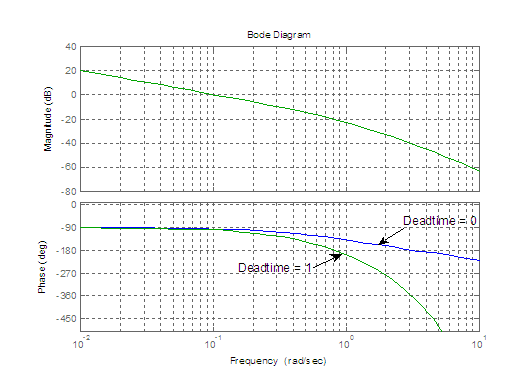
Fig. M9.7