MATLAB MODULE 4
Feedback System Simulation
Simulink Simulation
Simulink simulation is an alternative to block diagram manipulation followed by time-response analysis. From the Simulink model of a control system, output y in response to command r, output y in response to disturbance w, control u in response to command r, and all other desired internal variables can be directly obtained.
Example M4.3
Control system design methods discussed in this course are based on the assumption of availability of linear time invariant (LTI) models for all the devices in the control loop.
Consider a speed control system. The actuator for the motor is a power amplifier. An amplifier gives a saturating behaviour if the error signal input to the amplifier exceeds linear range value.
MATLAB simulink is a powerful tool to simulate the effects of nonlinearities in a feedback loop. After carrying out a design using LTI models, we must test the design using simulation of the actual control system, which includes the nonlinearities of the devices in the feedback loop.
Figure M4.6 is the simulation diagram of a feedback control system: the amplifier gain is 100 and the transfer function of the motor is 0.2083/(s +1.71). We assume the amplifier of gain 100 saturates at +5 or -5volts. The result of the simulation is shown in Fig. M4.7.
The readers are encouraged to construct the simulink model using the procedure described in Module 3. All the parameter settings can be set/seen by double clicking on related blocks.
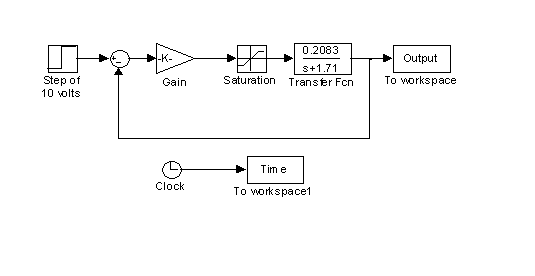
Fig. M4.6 ( download )
Time and Output response data have been transferred to workspace using
To Workspace block from
Sinks main block menu.
Clock block is available in
Sources main menu. These variables are stored in the structure
Output and Time in the workspace, along with the information regarding simulink model name. For example,
>> Output
Output =
time: [ ]
signals: [1x1 struct]
blockName: 'M4_3/To workspace Output'
>> Time
Time =
time: [ ]
signals: [1x1 struct]
blockName: 'M4_3/To workspace Time'
To access output and time values, one needs to access
Output.signals.values and
Time.signals.values . The step response plot has been generated by the following MATLAB script.
>> plot(Time.signals.values,Output.signals.values)
>> xlabel('Time (sec)');
>> ylabel('Output');
>> title('Step Response');
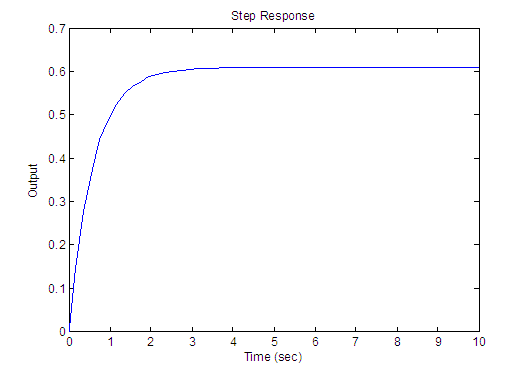
Fig. M4.7
Example M4.4
In this example, we simulate a temperature control system with measurement noise added to the feedback signal. The process transfer function is
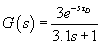
The deadtime  minutes. The measurement noise parameters we have used are: mean of 0, variance of 0.5, initial seed of 61233, and sample time of 0. The simulink inputs a step of 30 to the system (Fig. M4.8). Deadtime block in this figure is Transport Delay block from Continuous library, and Random Number block is from Sources library.
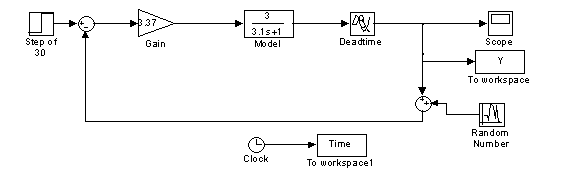
Fig. M4.8 ( download )
The data has been transferred to the workspace using
To Workspace block. The step response, generated using the following MATLAB script is shown in Fig. M4.9.
>> plot(Time.signals.values,Y.signals.values);
>> ylabel('Output (Y)');
>> xlabel('Time(min)');
>> title('Step Response');
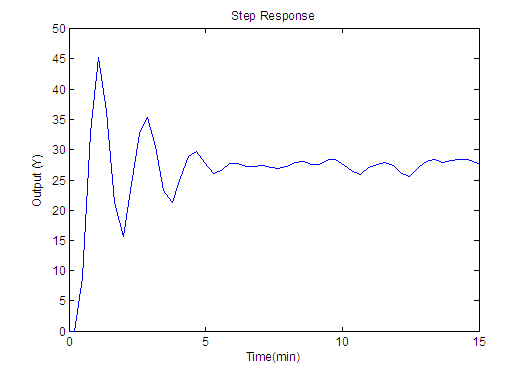
Fig. M4.9
The performance of the system with measurement noise removed, is shown in Fig. M4.10. To remove the effect of noise, simply disconnect the
Random number block from the
Sum block in the feedback path.
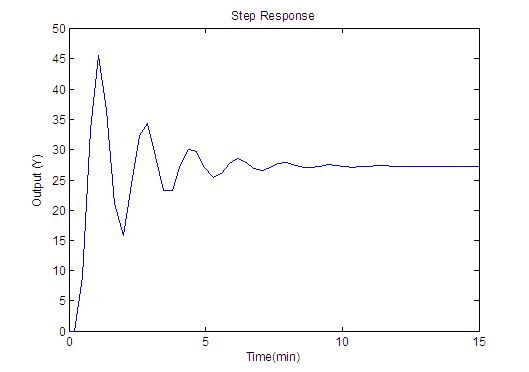
Fig. M4.10