MATLAB MODULE 2
Control System Toolbox and Symbolic Math Toolbox
Symbolic Math Toolbox
MATLAB's Symbolic Math (Symbolic Math ematics) toolbox allows users to perform symbolic mathematical computations using MATLAB. The only basic requirement is to declare symbolic variables before they are used. For control systems analysis and design, symbolic math toolbox is particularly important because of the following:
- Transfer functions and other expressions can be entered in symbolic form as we write them in the notebook.
- Symbolic expressions can be manipulated algebraically and simplified.
- It is straightforward to convert symbolic polynomials to the vectors of corresponding power-term coefficients.
- Expressions can be ‘pretty printed' for clarity in the MATLAB command window.
Type
help symbolic on the MATLAB command prompt to see all the functionalities available with Symbolic Math toolbox. In this section, we will learn commands of Symbolic Math toolbox particularly useful for control engineering.
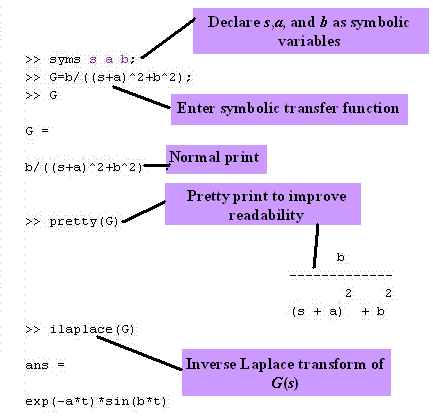
First we demonstrate the power of Symbolic Math toolbox by calculating inverse Laplace transform. The following MATLAB session gives the steps performed during the calculation of inverse Laplace transform of 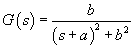 using Symbolic Math. using Symbolic Math.
Exercise M2.8
Initialize s and T as symbols. Using Symbolic Math tools, find the response of the first- order system  ,with the step excitation of strength A . ,with the step excitation of strength A .
Hint: Find the inverse Laplace transform of 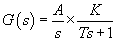 . .
Exercise M2.9
Find manually the Laplace transform of 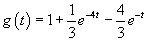 . Using Symbolic Math tools, declare t as symbolic variable and countercheck your result. Use the function laplace(g) to calculate the Laplace transform. . Using Symbolic Math tools, declare t as symbolic variable and countercheck your result. Use the function laplace(g) to calculate the Laplace transform.
|
The function
simple(G)
finds simplest form of G(s) with the least number of terms.
simplify(G)
can be used to combine partial fractions. Symbolic Math toolbox also contains other commands that can change the look of the displayed result for readability and form. Some of these commands are:
collect(G)
- collects common-coefficient terms of G(s);
expand(G)
- expands product of factors of G(s);
factor(G)-factors G(s);
vpa(G, places)
- stands for variable precision arithmetic (this command converts fractional symbolic terms into decimal terms with a specified number of decimal places).
Consider the function 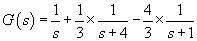 . MATLAB response to the simplification of . MATLAB response to the simplification of  using the function simplify is shown below. using the function simplify is shown below.
>> syms s
>> G = (1/s)+(1/3)*(1/(s+4))-(4/3)*(1/(s+1))
G =
1/s+1/3/(s+4)-4/3/(s+1)
>> pretty(G)
...................1 ....................1
1/s + 1/3 ------- ...- 4/3...-------
................s + 4...............s + 1
>> pretty(simplify(G))
.............4
--------------------
s (s + 4) (s + 1)
In the above example, the symbolic fractions 1/3 and 4/3 will be converted to 0.333 and 1.33 if the argument
places in
vap(G, places) is set to 3.
>> pretty(vpa(G,3))
............0.333 ....1.33
1/s + ---------- - ----------
........... s + 4. ....s + 1.
Exercise M2.10
Consider the function  . Show using Symbolic Math tools that the simplified form of its Laplace transform is . Show using Symbolic Math tools that the simplified form of its Laplace transform is 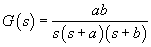 . . |
Basic mathematical operators +,  , ,  , and , and  are applicable to symbolic objects also. For example, simplification of the closed-loop system with forward gain are applicable to symbolic objects also. For example, simplification of the closed-loop system with forward gain  forward-path transfer function forward-path transfer function 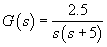 , and feedback-path transfer function , and feedback-path transfer function 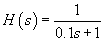 , is given by , is given by 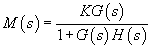 . This can be done using Symbolic Math toolbox as follows . This can be done using Symbolic Math toolbox as follows
>> syms s K;
>> G = 2.5/(s*(s+5));
>> H = 1/(0.1*s+1);
>> M = K*G/(1+G*H)
M =
5/2*K/s/(s+5)/(1+5/2/s/(s+5)/(1/10*s+1))
>> pretty(M)
			                  K
5/2 ------------------------------------------
             /                         1             \
   s (s + 5)| 1 + 5/2      ----------------------     |
             \              s (s + 5) (1/10 s + 1)   /
>> pretty(simplify(M))
           (s + 10) K
5/2  -------------------------
        3      2
       s + 15 s + 50 s + 25
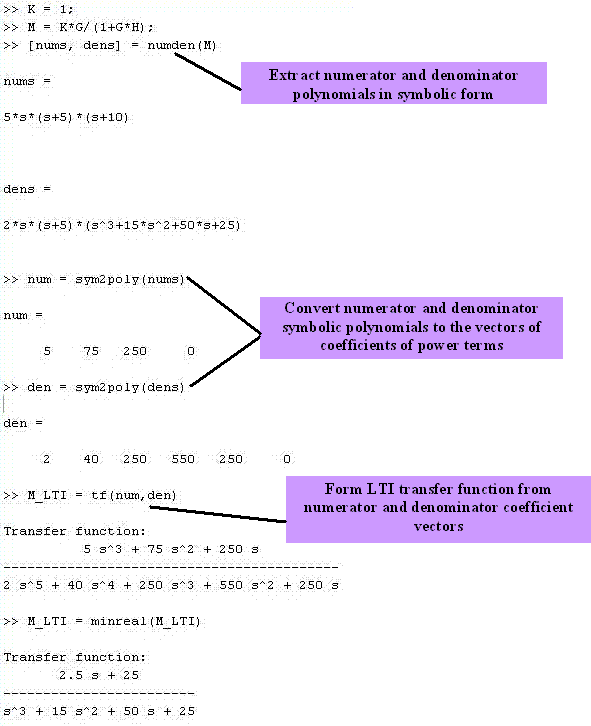
With Symbolic Math toolbox, symbolic transfer functions can easily be converted to the LTI (Linear Time-Invariant) transfer function objects. This conversion is done in two steps. The first step uses the command numden to extract the symbolic numerator and denominator of G (s). The second step converts, separately, the numerator and denominator to vectors using the command sym2poly . The last step consists of forming the LTI transfer function object by using the vector representation of the transfer function's numerator and denominator. The command sym2poly doesn't work on symbolic expressions with more than one variable.
As an example, we form the LTI object from  obtained in the above example with obtained in the above example with  . .

The command
poly2sym
converts polynomial coefficient vectors to symbolic polynomial. Learn more about
poly2sym
using online help.
|